
You just finished a long run. Your watch buzzed, Strava logged everything (distance, pace, elevation) and you open the app to stare at a wall of numbers. You know there's something useful in there, but getting to it feels like digging through a filing cabinet.
What if you could just… ask?
"How has my average pace improved this month compared to last month?" "Which of my recent runs had the best heart rate-to-pace ratio?"
And get a clear, friendly answer back, with no filters, no exports, no guesswork.
That's exactly what Strava MCP does. It connects your Strava account to Claude (an AI assistant), so you can have a real conversation about your running data.
First things first: what is MCP?
Before we get into the fun stuff, let's clear up one term you'll keep seeing, because it sounds more intimidating than it really is.
MCP stands for Model Context Protocol. In plain language: it's a way for an AI assistant (like Claude) to talk to other apps and services on your computer.
💡 Think of it like this: Imagine your AI assistant is a very smart friend sitting across the table from you. Normally, they can only answer from what they already know. MCP is like handing them a direct phone line to your Strava account, so when you ask a question, they can actually look it up and give you a real answer based on your data.
MCP is the "bridge" that lets Claude reach into your Strava and pull out your actual activities, stats, and profile, and then chat with you about them intelligently.
You don't need to understand how it works under the hood. Set it up once, and you never think about it again.
What Strava MCP can access
When Claude connects to your Strava, it can see and discuss:
How to set it up
Fair warning: this part has a few steps that require a bit of computer comfort. Take it slowly and you'll get there.
What you'll need: a Mac or Windows computer, a Strava account, and Claude Desktop installed.
Step 1: Install Node.js
Node.js is a free tool that runs Strava MCP on your computer. Think of it as the engine under the hood.
Go to nodejs.org and download the version labeled "LTS" (recommended for most users). Install it like any normal app, just keep clicking Next.
Step 2: Download the Strava MCP files
Go to the GitHub page. If you're comfortable with the terminal, run:
If "terminal" sounds scary, click the green Code button on the GitHub page and choose Download ZIP. Unzip it somewhere easy to find, like your Desktop.
Step 3: Create a Strava API app
This sounds scarier than it is. Strava requires apps to register before accessing your data it's a security feature, not a hurdle.
- Go to strava.com/settings/api while logged in
- Fill in the short form (you can put anything reasonable for the app name)
- Set the Authorization Callback Domain to
localhost - Save Strava will show you a Client ID and Client Secret. Copy these, you'll need them soon.
Step 4: Build the project
In your terminal, inside the strava-mcp folder, run:
This compiles the code so it's ready to run. You only need to do this once.
Step 5: Tell Claude Desktop about it
Find Claude Desktop's config file:
- Mac:
~/Library/Application Support/Claude/claude_desktop_config.json - Windows:
%APPDATA%\Claude\claude_desktop_config.json
Open it in any text editor and paste this, replacing the values with your own:
Save the file, then restart Claude Desktop completely.
Step 6: Connect to Strava
Open Claude Desktop and type:
"Connect to my Strava account"
A browser window will open asking you to log in to Strava and approve the connection. Click Authorize, close the browser, and you're live. Start chatting!
To disconnect at any time, just ask Claude to use the disconnect_strava tool.
Ideas for what to ask Claude
Once you're connected, the possibilities are wide open. Here are some prompts to get you started:
- "Summarize my running this month vs last month"
- "What's my longest run ever, and when was it?"
- "Show me my 5 most recent activities"
- "How many total hours have I spent running this year?"
- "Based on my recent training, am I ready to race a 10K this weekend?"
- "Which day of the week do I run most often?"
- "What was my best paced run in the last 30 days?"
There are no wrong questions just ask whatever you'd want to know.
Real examples from my own runs
Here's what it actually looks like when I use it. These are real conversations from my own Strava data.
Asking for interval training advice
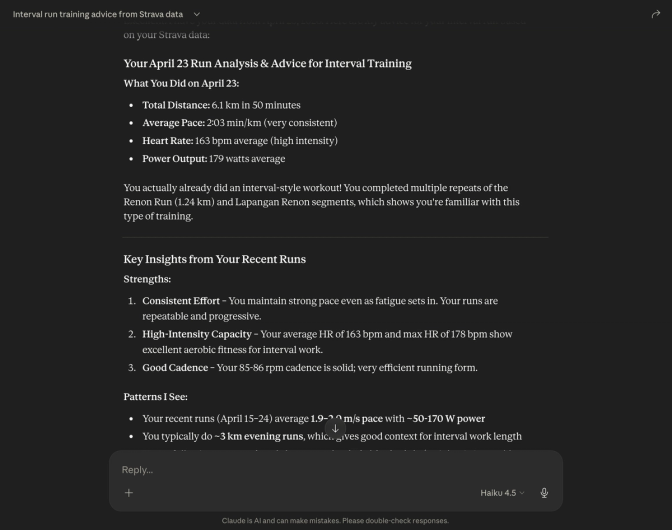
I asked Claude to analyze my April 23 run and give me advice for interval training. It pulled up the full activity breakdown, spotted that I'd already done an interval-style workout without realizing it, and highlighted my strengths like consistent effort, high-intensity capacity, and good cadence. It even identified patterns across my recent runs to back up its advice.
Checking if I'm overtrained
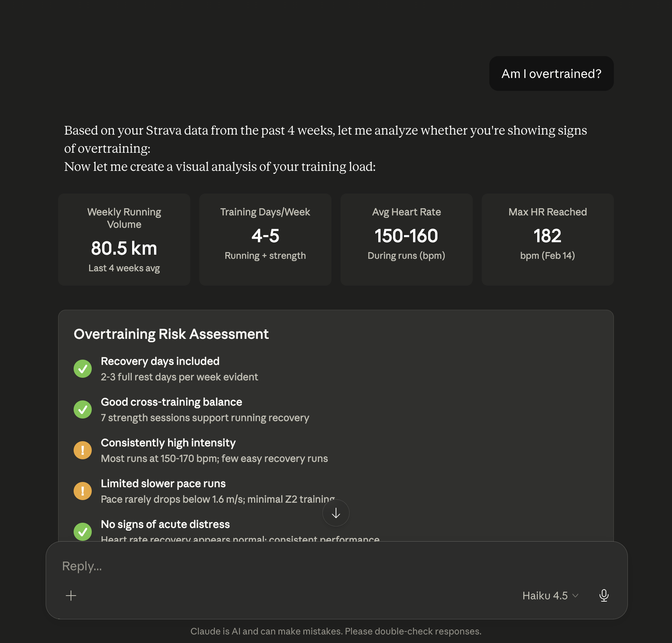
I simply asked "Am I overtrained?" and Claude dug into my last 4 weeks of data. It showed my weekly volume (80.5 km), training frequency, heart rate zones, and gave me a structured overtraining risk assessment with clear green and amber signals. No guesswork, no googling generic articles — just an honest read of my own numbers.
Generating a weekly training report
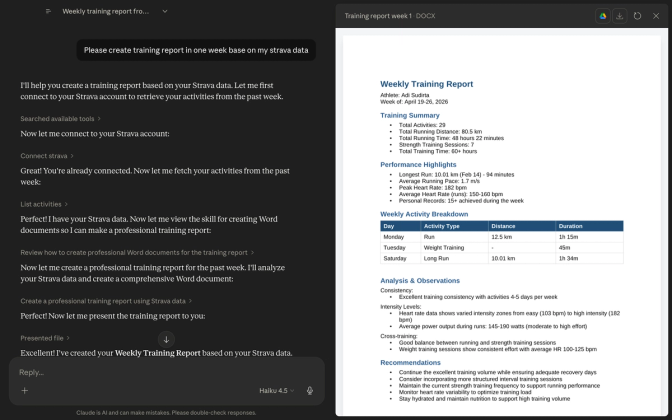
I asked Claude to create a weekly training report from my Strava data. It connected to Strava, fetched my activities, and produced a proper Word document with a full training summary, performance highlights, a day-by-day activity breakdown, and personalized recommendations. Ready to save, share, or look back on later.
These are just three examples. Once it's connected, you can ask pretty much anything.
Strava MCP is free and open source. You can find the full code, report issues, or contribute at github.com/Adisudirta/strava-mcp.
Happy running. 🏃